Blackboard Learn and Technology Sessions
In-Person  Webinar
August 2026
Tuesday, August 4, 10:30am - 11:30am - Webinar
This workshop is designed for Blackboard users who are familiar with the new Ultra Course View but want a more intensive look at the UCV Gradebook. In this 60-minute session, a consultant from eLearning Services will share best practices and tips & tricks for setting up a Gradebook that works for you, present a live demonstration, and answer questions. Register
Thursday, August 13, 9:00am - 10:00am - Webinar
This workshop familiarizes attendees with Blackboard Learn’s Ultra Course View. eLearning Services will demonstrate how instructors can navigate a UCV course, communicate with students, add content, find and utilize Blackboard tools, and grade assignments. Register
Thursday, August 13, 10:30am - 11:30am - Webinar
This workshop is designed for Blackboard users who are familiar with the new Ultra Course View but want a more intensive look at the UCV Gradebook. In this 60-minute session, a consultant from eLearning Services will share best practices and tips & tricks for setting up a Gradebook that works for you, present a live demonstration, and answer questions. Register
Thursday, August 13, 1:00pm - 2:00pm - Webinar
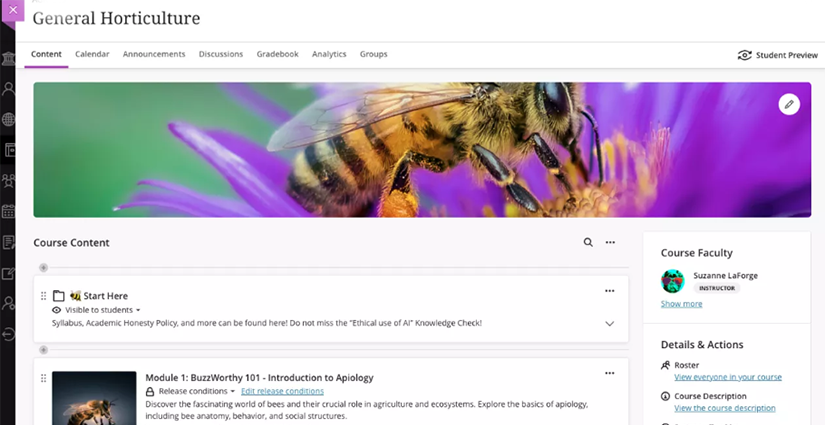
In this session you'll learn how to transform your Blackboard Learn Ultra course from ordinary to extraordinary! Discover how best to organize your content to make your course visually engaging and user-friendly and then take it a step further with customization to add some pizazz. Whether you're looking to streamline your course structure, add some creative touches, or both, this session will give you the tools to make your course stand out. Register
Thursday, August 13, 2:30pm - 4:00pm - Webinar
This comprehensive 90-minute workshop introduces educators to using both Panopto and Zoom within Blackboard Learn to create engaging, effective online learning experiences. Participants will learn how to create and manage video content with Panopto, integrate recordings seamlessly into their courses, and leverage Zoom for live virtual sessions.
The session will also cover scheduling and managing Zoom meetings, handling recordings, and organizing video content for easy student access. Whether you are new to these tools or looking to streamline your workflow, this training provides practical strategies to enhance teaching and learning with integrated video and web conferencing solutions. Register
Friday, August 14, 9:00am - 9:40am - Webinar
In this workshop, you will learn how to enhance your courses in Blackboard's Ultra Course View. This session will guide you through setting accommodations for students, making your content more accessible, and applying universal design best practices. By the end of the workshop, you’ll be equipped with practical strategies to create a more inclusive and effective learning environment for all students. Don't miss this opportunity to make your courses better for everyone! Register
Friday, August 14, 12:30pm - 1:30pm - Webinar
This workshop familiarizes attendees with Blackboard Learn’s Ultra Course View. eLearning Services will demonstrate how instructors can navigate a UCV course, communicate with students, add content, find and utilize Blackboard tools, and grade assignments. Register
Friday, August 14, 2:00pm - 3:00pm - Webinar
iClicker Cloud is a mobile-optimized engagement platform designed to facilitate student, educator, and institutional collaboration. iClicker Cloud includes both synchronous and asynchronous options including polling, quizzing, and assignments. Integrated right into Blackboard, iClicker can help instructors increase attendance and participation, provide instant feedback and identify misconceptions in real time, regardless of class size or the delivery method. Register
September 2026
Thursday, September 10, 10:00am - 11:00am
In this session you'll learn how to transform your Blackboard Learn Ultra course from ordinary to extraordinary! Discover how best to organize your content to make your course visually engaging and user-friendly and then take it a step further with customization to add some pizazz. Whether you're looking to streamline your course structure, add some creative touches, or both, this session will give you the tools to make your course stand out. Register
Thursday, September 17, 10:00am - 11:00am
New to Blackboard Ultra or do you need a refresher? This workshop covers the essentials of building and managing an Ultra course in Blackboard, including how to add and organize content, communicate with students, send announcements, and more. Participants will leave with a practical foundation for creating a clear, student-friendly course experience. Register
Thursday, September 24, 2026, 11:00am - 12:00pm
Learn how to confidently set up and manage your Blackboard Ultra Gradebook. We'll cover creating and organizing gradable items, configuring categories and calculations, and better understanding recent updates to Gradebook that will streamline your workflow. Register
October 2026
Thursday, October 15, 10:00am - 11:00am
In this workshop, we will guide you through setting accommodations for students, making your content more accessible, and applying universal design best practices. By the end, you'll be equipped with practical strategies to make your course a more inclusive and effective learning environment for all students. Register
Monday, October 19, 2:00pm - 3:00pm
Learn how to confidently set up and manage your Blackboard Ultra Gradebook. We'll cover creating and organizing gradable items, configuring categories and calculations, and better understanding recent updates to Gradebook that will streamline your workflow. Register
November 2026
Thursday, November 12, 10:30am - 11:30am
Learn how to confidently set up and manage your Blackboard Ultra Gradebook. We'll cover creating and organizing gradable items, configuring categories and calculations, and better understanding recent updates to Gradebook that will streamline your workflow. Register
December 2026
Thursday, December 3, 9:00am - 10:00am
Start the next semester with a course that is organized, accurate, and ready for students. This workshop covers copying your course content, reviewing and cleaning up old content, updating due dates and availability settings, and configuring your Gradebook early to avoid headaches later on. Register